




I use the Amazon Shopping app less like a traditional store and more like a reflex. That is probably the best way to understand why it became such a dominant mobile shopping tool. The app is not only about buying something after a long, careful browsing session. It is about checking prices, reading reviews, tracking deliveries, saving products, comparing options, scanning items, reordering household basics, and making small purchase decisions before they become chores. What stood out to me is how well the app compresses the entire shopping process into a phone-friendly routine. It can feel convenient, powerful, and slightly dangerous at the same time, because the distance between “I should look that up” and “it is in my cart” becomes very short.
The App Works Because Search Feels Immediate
The strongest part of Amazon Shopping is still search. I can open the app, type a product name, brand, category, or vague description, and usually get a huge list of results within seconds. That speed matters because mobile shopping often happens in small gaps: while making a list, comparing something in a store, replacing a broken item, or checking whether a household product is cheaper online.
I like that search does not require me to know the exact product name. The app is built around browsing from uncertainty. I can start broad, then filter by price, rating, delivery speed, brand, features, or availability. That makes Amazon Shopping feel practical when I know what I need, but also useful when I am still figuring it out.
Product Pages Give Too Much Information, Which Is Sometimes Useful
Amazon product pages can feel crowded, but I understand why. A single page may include images, videos, descriptions, variations, ratings, reviews, delivery estimates, seller details, frequently bought items, comparison boxes, questions, and recommendations. It is not minimal, but it is designed to answer purchase doubts quickly.
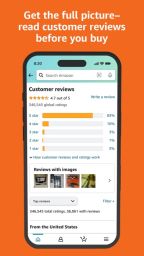
For me, the reviews are one of the biggest reasons to use the app. I rarely trust product photos alone. I want to see what buyers say after using the item in real life. The best review sections help me notice patterns: sizing problems, durability concerns, missing parts, packaging issues, or features that work better than expected. The app is strongest when the review ecosystem helps me avoid a disappointing purchase.
-
Ratings give a quick first impression of product quality;
-
Customer photos often feel more useful than polished brand images;
-
Q&A sections can answer practical product questions;
-
Comparison tools help narrow down similar options;
Order Tracking Makes the App Feel Like a Control Center
One of the most useful parts of Amazon Shopping is order tracking. After buying something, I do not need to search through emails or browser tabs. The app gives a central place to check shipping status, delivery estimates, past orders, returns, and reorder options. That makes it feel less like a shop and more like a personal logistics dashboard.
This is especially helpful for frequent buyers. When multiple packages are arriving at different times, the app reduces confusion. I can check what has shipped, what is delayed, what has arrived, and whether something needs attention. That practical layer is one of the reasons the app becomes a habit even when I am not actively shopping.
Amazon Lens Makes Real-World Shopping More Connected
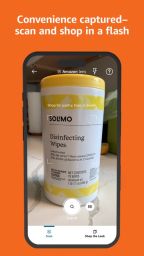
Amazon Lens is one of the app’s most interesting features because it connects offline curiosity with online search. Amazon describes it as a way to upload an image, take a photo, or scan a barcode to find exact matches or similar products in the Amazon Shopping app. That can be genuinely useful when I see an item in real life but do not know the brand or model.
I like this feature most for comparison shopping. If I see a product in a store, I can scan or photograph it and check whether Amazon has the same item, similar versions, better reviews, or a more convenient delivery option. It does not always mean Amazon is the best choice, but it gives me more information before I buy.
The Cart and Wish List Features Encourage Planning
The cart is simple, but the wish list and saved-for-later functions are where the app becomes more useful. I often use Amazon Shopping to collect options before making a final decision. A list can become a gift plan, a home project plan, a reading list, a baby registry idea, a tech comparison board, or a simple reminder of things I might need later.
This matters because not every shopping session should end in an immediate purchase. The app can push users toward quick buying, but it also gives tools for slower decision-making. I can save items, compare them later, wait for a price change, or return to a product after reading more reviews. Used carefully, lists make Amazon feel less chaotic.
-
Wish lists are useful for gifts and future purchases;
-
Saved-for-later items help delay impulse buys;
-
The cart makes it easy to compare totals before checkout;
-
Reorder options simplify repeat household purchases;
Deals Are Useful, but They Need Discipline
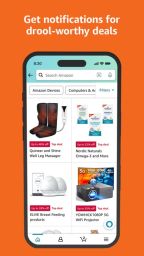
The deals section can be helpful, especially during major sale periods or when I already know what category I am watching. Discounts, coupons, limited-time offers, and personalized recommendations can save money when used with intention. The problem is that deal browsing can easily turn into buying things I did not actually need.
I think Amazon Shopping is strongest when I enter with a purpose. If I am comparing a specific product, checking reviews, or buying something necessary, the app feels efficient. If I browse deals without a plan, it can become an endless feed of temptations. That is not a technical flaw exactly, but it is part of the user experience.
The App’s Convenience Is Its Biggest Strength and Weakness
Amazon Shopping makes buying feel almost too easy. Stored payment methods, saved addresses, order history, fast checkout, delivery estimates, and Prime-related benefits can turn the purchase process into a few taps. That convenience is the reason people use it so often, but it also means users need to be aware of how quickly small purchases add up.
I appreciate the speed when I am replacing basics: batteries, cleaning supplies, cables, books, toiletries, kitchen items, or small household tools. In those cases, convenience feels genuinely valuable. But the same speed can encourage impulse buying if I am scrolling casually. The app is efficient, and efficiency is powerful.
Visual Search and Barcode Scanning Feel Practical
The App Store listing notes that users can tap the scan icon in the search bar, take a picture of an item or barcode, and search for it through the app. I like this because it reduces the friction of typing long product names, model numbers, or confusing package descriptions.
Barcode scanning is especially useful for everyday items. If I want the same shampoo, supplement container, book edition, toy, or kitchen product, scanning can be faster than searching manually. Visual search is more flexible, especially when I do not know what an item is called. These tools make the app feel more connected to the physical world.
-
Barcode scanning helps identify exact products quickly;
-
Image search helps when the product name is unknown;
-
Camera-based search can support in-store comparison;
-
Visual discovery makes casual product research easier;
The Interface Is Dense but Familiar
Amazon Shopping is not the cleanest shopping app visually. It contains a lot: search results, sponsored placements, product cards, recommendations, banners, cart reminders, delivery messages, price labels, ratings, and promotional sections. At times, it feels crowded. Still, it is familiar enough that I rarely feel lost.
The density is part of Amazon’s identity. The app is trying to show availability, price, speed, proof, and alternatives all at once. That can be overwhelming, but it also means I usually find the information I need without leaving the app. I would not call the design elegant. I would call it functional, busy, and effective.
Customer Reviews Are the App’s Most Human Feature
The reviews section is where the app feels least like a warehouse and most like a conversation. Customer photos, long explanations, star breakdowns, and practical complaints can reveal what a product is really like. I often learn more from a few detailed reviews than from a polished product description.
Of course, reviews require judgment. Not every review is equally useful, and some products have mixed feedback for reasons that depend on personal expectations. But when many reviews point to the same strength or weakness, that pattern helps. The app gives me enough material to make a more informed choice.
Returns and Order History Reduce Purchase Anxiety
Order history is a small feature that becomes important over time. I can find previous purchases, reorder items, check product details, or start a return when needed. That makes the app feel reliable for repeat purchases and problem-solving. Shopping does not end at checkout, and Amazon understands that.
Returns are especially important for online shopping because products do not always match expectations. Sizing, color, texture, quality, and compatibility can differ from what I imagined. Having order management inside the app reduces anxiety because I know where to go if something needs to be fixed.
Privacy and Notifications Need Careful Settings
The Amazon Shopping app can request permissions for features such as camera-based search, notifications, voice shopping, authentication, reviews, and other functions depending on the device and feature set. The App Store listing notes that these permissions help enable features such as visual search, voice shopping, notifications, customer reviews, and authentication.
I think users should take a few minutes to adjust settings. Notifications can be helpful for delivery updates and deals, but too many alerts can make the app feel intrusive. Camera access is useful for scanning, but not everyone needs every permission active all the time. The app works best when it is configured around how someone actually shops.
Where Amazon Shopping Feels Most Useful
Amazon Shopping is most useful when speed, comparison, and order management matter. If I need to replace a known product, check reviews quickly, compare prices, track a delivery, or save possible purchases, the app does the job very well. It removes friction from practical shopping.
It is also useful for product research. Even when I do not buy through Amazon, I sometimes use the app to read reviews, compare specs, or identify product alternatives. That says a lot about its role. It is not only a checkout tool. It is one of the default places many people go to understand what is available.
Where Amazon Shopping Feels Less Strong
The app can feel overwhelming when search results are crowded with similar items, sponsored placements, confusing variations, or brands that look nearly identical. Finding the best product sometimes takes patience. A huge marketplace is useful, but it also means the user has to sort through noise.
I also think the convenience requires self-control. Fast checkout, deal alerts, recommendations, and personalized browsing can encourage unnecessary purchases. The app is extremely good at reducing hesitation. That is helpful when buying essentials, but less helpful when boredom becomes the reason to shop.
Pros
- Fast product search across a huge marketplace
- Useful customer reviews, photos, ratings, and Q&A sections
- Order tracking and order history make delivery management simple
- Amazon Lens, barcode scanning, and visual search help identify products quickly
- Wish lists, saved items, and reordering tools support planned shopping
Cons
- The interface can feel crowded with recommendations, ads, and similar products
- Fast checkout can encourage impulse buying
- Search results sometimes require careful filtering to avoid low-quality options
- Notifications and permissions may need manual adjustment for comfort
- Deal browsing can become distracting if the user does not have a clear goal