









I opened Call of Duty®: Mobile expecting a smaller version of the console experience, but the game feels more confident than a simple pocket-sized imitation. It understands that mobile players want speed, clarity, short sessions, and flexible controls, while Call of Duty fans still expect recognizable weapons, intense firefights, classic maps, competitive modes, and that familiar rhythm of earning rewards after every match. What surprised me most is how much content the game manages to fit into a phone. Multiplayer, Battle Royale, Zombies, ranked play, seasonal events, operators, weapon customization, scorestreaks, and limited-time modes all sit inside one mobile package. It can feel crowded, but it also gives the game a strong reason to stay installed.
The First Impression Is Pure Call of Duty Energy
Call of Duty®: Mobile makes its identity clear almost immediately. The menus are loud, the rewards arrive quickly, the weapon screens are full of options, and the game pushes the player toward action fast. It does not feel like a quiet mobile shooter trying to slowly introduce itself. It feels like a full franchise experience compressed into touch controls and short match formats.
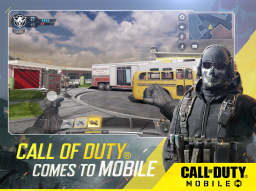
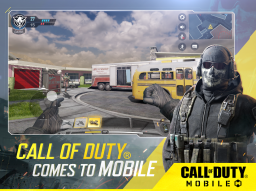
The official Call of Duty Mobile page describes the game around the thrill of Call of Duty on the go, with multiplayer and battle royale as central pillars. That is exactly the appeal. I can play a quick Team Deathmatch-style session, jump into a bigger survival mode, or chase seasonal rewards without needing a console, controller, or long setup. The game’s biggest strength is how quickly it turns a few free minutes into a firefight.
5v5 Multiplayer Is Still the Sharpest Mode
For me, the standard multiplayer modes are the core of Call of Duty®: Mobile. Google Play highlights fast 5v5 team deathmatches, classic modes such as Team Deathmatch, Domination, and other fan-favorite formats, along with recognizable maps like Nuketown, Shipment, Raid, Standoff, and others. These modes work because they keep the action tight and readable.
I like 5v5 because it gives the mobile version the right match size. It is chaotic enough to feel energetic, but not so crowded that every spawn becomes nonsense. A small map turns every corner into a risk. A good flank can change the score. A poorly timed reload can lose a duel. The matches are short enough for mobile play, yet familiar enough for longtime Call of Duty players to feel at home.
-
5v5 matches keep the action fast and easy to enter;
-
Classic objectives make the game familiar to franchise fans;
-
Small maps work well for short mobile sessions;
-
Fast respawns reduce frustration after mistakes;
The Classic Maps Carry a Lot of Nostalgia
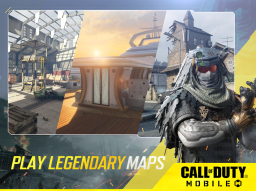
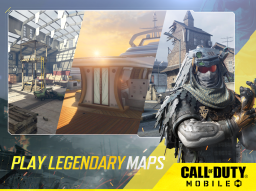
One of the smartest things Call of Duty®: Mobile does is use recognizable maps from across the wider franchise. The official site lists classic multiplayer maps such as Nuketown, Shoot House, Raid, Rust, Terminal, and Satellite. These names matter because they instantly connect the mobile game to years of Call of Duty memory.
I enjoy these maps because they bring familiarity without feeling too large for phones. Nuketown gives that tiny, explosive rhythm where danger is always nearby. Rust feels like a vertical scramble. Raid gives more room for controlled lanes and map awareness. The mobile version benefits from maps that already know how to create tension, choke points, and quick encounters.
The Controls Are Better Than I Expected, but Still a Personal Choice
Mobile FPS controls are always a challenge, and Call of Duty®: Mobile handles them better than many competitors. Google Play mentions customizable and intuitive controls, voice and text chat, 3D graphics and sound, and controller support. That flexibility matters because players have very different comfort levels on touchscreens.
I like that the game lets me adjust the interface instead of forcing one layout on everyone. Some players want simplified firing. Others want more manual control. Some will use touch only, while others may prefer a controller for comfort and precision. The game feels strongest when the controls are tuned to the player’s habits. Out of the box, it is playable, but the real comfort comes after customizing sensitivity, buttons, and aim behavior.
Battle Royale Makes the Game Feel Much Larger
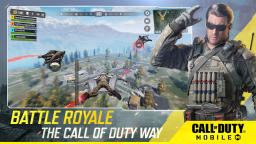
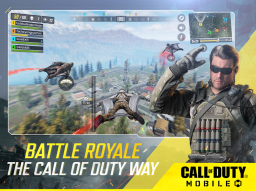
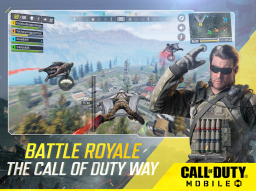
Battle Royale gives Call of Duty®: Mobile a completely different pace. The official site describes multiple Battle Royale maps and modes, including Alcatraz, Isolated, and Krai, with casual and competitive options. This mode stretches the game beyond short arena fights and lets it become more about looting, positioning, survival, rotations, and squad decisions.
I enjoy Battle Royale when I want something more spacious than standard multiplayer. The tension is slower, but the stakes feel higher because one bad move can end a long run. It also gives the game more variety. Instead of only reacting to enemies around corners, I am thinking about where to land, when to move, whether to engage, and how to survive the final circles.
-
Battle Royale gives the game a larger and more tactical pace;
-
Squad play makes communication more important;
-
Different maps and limited-time modes keep survival gameplay fresh;
-
The mode is better for longer sessions than quick multiplayer matches;
Zombies Adds a Useful PvE Break
Zombies is important because it changes the mood from player-versus-player pressure to survival against waves of enemies. Google Play currently presents Zombies as one of the major experiences alongside Multiplayer and Battle Royale. I like having that option because competitive modes can become mentally tiring after several matches.
Zombies gives the game a more cooperative, arcade-like flavor. It still has weapons, movement, and pressure, but the emotional texture is different. Instead of worrying about a skilled opponent out-aiming me, I am trying to survive the escalating chaos. That makes it a useful change of pace, especially when I want Call of Duty action without ranked tension.
Loadouts Make Every Player Feel More Specific
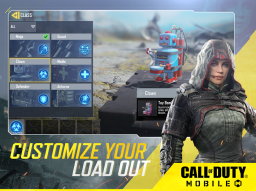
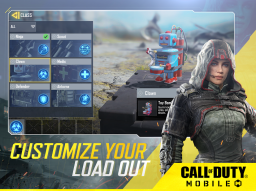
Weapon customization is one of the reasons Call of Duty®: Mobile keeps players engaged. Google Play mentions unlocking operators, weapons, outfits, scorestreaks, and gear so players can shape their own style. That progression loop is very Call of Duty: play matches, unlock items, adjust the loadout, return stronger or at least more personalized.
I like how loadouts let me build around different habits. A fast SMG setup encourages aggressive pushes. An assault rifle gives more flexibility. A sniper changes the whole map relationship. Scorestreaks add another layer because they reward good momentum. The game becomes more satisfying when a loadout starts to feel like my own rather than a default kit.
-
Weapon customization supports different playstyles;
-
Scorestreaks reward strong match momentum;
-
Operators and outfits add personality to progression;
-
Gear choices make repeated matches feel more personal;
The Gunsmith Layer Adds Depth, but Also Complexity
The deeper weapon-building systems are one of the best and most intimidating parts of the game. Attachments, recoil control, mobility, range, accuracy, and aim speed all become part of how a weapon feels. A gun can change dramatically depending on how it is built.
I enjoy this because it rewards experimentation. A weapon that feels weak at first may become comfortable with the right attachments. But the system can also overwhelm new players. There are many stats, currencies, unlocks, skins, and menus. Call of Duty®: Mobile is at its best when customization feels empowering, not like homework before the match.
Ranked Play Gives the Game a Competitive Spine
Ranked Multiplayer and League Play are part of the current Google Play description, which shows how strongly the game supports competitive players. Ranked changes the emotional weight of every match. A casual loss is easy to ignore. A ranked loss feels like feedback, even when the feedback is painful.
I like ranked when I want clearer stakes. Team composition, map knowledge, aim consistency, and objective discipline matter more. It also reveals how different Call of Duty®: Mobile feels when everyone is playing seriously. The same map that feels chaotic in casual play can become structured when both teams care about lanes, spawns, and coordinated pushes.
Seasonal Updates Keep the Game From Standing Still
Call of Duty®: Mobile is built as a live-service game, and seasonal updates are one of its defining features. Google Play says the game receives new seasonal content updated monthly, including modes, maps, themed events, rewards, and unlockable content. Activision’s 2026 Season 5 post also highlighted a themed collaboration, new modes, Armored Royale, the BAL-27 Assault Rifle, a Battle Pass, and more.
This constant movement keeps the game feeling alive. There is usually something new to check: a seasonal challenge, event currency, a limited-time mode, a battle pass tier, or a weapon release. The downside is that the game can feel busy. If I step away for a while, returning can feel like opening a drawer full of notifications. Still, for active players, the seasonal rhythm is a major reason to keep coming back.
-
Monthly seasonal content gives players new reasons to return;
-
Limited-time modes help familiar gameplay feel fresh;
-
Battle Pass rewards add structure to long-term play;
-
Frequent updates can make menus and progression feel crowded;
The Visuals Are Impressive for Mobile
Call of Duty®: Mobile still looks strong as a phone shooter. The game uses detailed operators, recognizable weapons, crisp map layouts, readable effects, and energetic sound design to make firefights feel close to the franchise’s mainline identity. It is not the same as playing on a high-end console or PC, but it does enough to sell the fantasy.
I especially like how the visuals balance detail with readability. In a mobile FPS, visual clutter can ruin gameplay quickly. Call of Duty®: Mobile has a lot happening on screen, but enemies, objectives, hit feedback, and map features usually remain clear enough to support fast decisions. The game understands that mobile spectacle must still be functional.
The Audio Makes the Action Feel Bigger Than the Screen
Sound is a major reason the game feels intense. Weapon fire, footsteps, scorestreak announcements, explosions, and operator cues all make matches feel more dramatic. On a small screen, audio helps create scale. It tells me where danger might be, when chaos is building, and when a match is turning.
I also like how familiar Call of Duty sound language carries over. Even without a console setup, the game still has that loud military-arcade rhythm: rapid gunfire, urgent calls, victory cues, and match-start energy. It gives the mobile version a stronger franchise identity than visuals alone could provide.
The Social Layer Matters More Than It First Seems
Voice and text chat are mentioned in the Google Play description, and those tools are useful because Call of Duty®: Mobile is much better with coordination. A team that communicates in objective modes has a clear advantage. Battle Royale squads also benefit from callouts, planning, and shared awareness.
I like the social side most when playing with friends. Random matches can be fun, but the game becomes more strategic when teammates agree on roles, routes, and objectives. The short match format also makes it easy to play several rounds together without needing a long gaming session.
The Monetization Is Hard to Ignore
Call of Duty®: Mobile is free-to-play, and that accessibility is a huge advantage. But free-to-play design also means the game includes battle passes, draws, cosmetics, offers, currencies, and unlock systems. Activision’s seasonal posts regularly mention Battle Passes, Draws, operators, and themed rewards, which shows how central that content economy is to the game’s structure.
I do not think monetization ruins the game, because the core shooting can still be satisfying without buying every cosmetic. But the store presence is constant. Players who enjoy skins, rare operators, and weapon designs may feel tempted often. For younger players especially, it is worth setting clear limits. The best part of Call of Duty®: Mobile should be the matches, not the pressure to chase every item.
-
The game is free to download and easy to try;
-
Cosmetics and battle passes add long-term collection goals;
-
Draws and limited-time offers can create spending pressure;
-
The core experience is strongest when purchases stay optional;
The Game Can Feel Overloaded for New Players
Call of Duty®: Mobile has a lot of content, and that is both impressive and exhausting. A new player may see multiple modes, ranked systems, loadouts, operators, events, currencies, pop-ups, weapon levels, battle pass screens, and limited-time rewards before fully understanding what matters. The game is generous with things to do, but the amount of information can be heavy.
I think the best way to approach it is to choose one mode first. Start with basic multiplayer, learn a few maps, build one or two weapons, then branch into Battle Royale, Zombies, or ranked play. Trying to understand everything at once can make the game feel more complicated than it really is.
The Mobile Format Changes the Call of Duty Rhythm
Call of Duty®: Mobile feels like Call of Duty, but it is not identical to console play. The matches are shorter, rewards arrive faster, controls are more customizable around touch input, and the game is built around constant seasonal engagement. That makes it feel more snackable than a traditional premium release.
I like that difference. The game does not need to replace console Call of Duty. It works best as a separate mobile version of the fantasy: quick firefights, familiar maps, recognizable weapons, and enough modes to fit different moods. It is Call of Duty designed around convenience.
Where Call of Duty®: Mobile Feels Most Effective
Call of Duty®: Mobile feels strongest when I jump into a quick multiplayer match and immediately get that clean loop of movement, aim, objective play, and reward. A close Domination comeback, a strong scorestreak chain, a clutch Battle Royale moment, or a Zombies session with friends can make the phone screen feel much bigger than it is.
The game succeeds because it understands both sides of its identity. It respects Call of Duty history through maps, operators, weapons, and familiar modes, but it also respects mobile habits through short sessions, touch customization, seasonal rewards, and fast access. That combination is why it remains one of the most recognizable mobile shooters.
Where Call of Duty®: Mobile Feels Less Strong
The biggest weakness is overload. There is so much content, so many menus, and so many reward systems that the game can feel noisy. Players who want a clean, minimal shooter may find the live-service structure distracting. The game is always trying to show something new, sell something, unlock something, or push the next event.
Touchscreen shooting may also remain a barrier for some players, even with good customization. A controller can help, but not everyone wants an accessory for a mobile game. Call of Duty®: Mobile is impressive on phones, but precision FPS gameplay will always feel more natural to some players on larger screens with dedicated controls.
Pros
- Strong mobile version of the Call of Duty experience with fast FPS action
- Includes Multiplayer, Ranked Multiplayer, League Play, Battle Royale, Zombies, and DMZ: Recon
- Classic maps, iconic operators, weapons, scorestreaks, and loadouts give the game franchise identity
- Customizable controls, voice chat, text chat, and controller support improve flexibility
- Monthly seasonal content, events, rewards, and Battle Pass updates support long-term replay value
Cons
- Menus, currencies, events, and rewards can feel overwhelming for new players
- Free-to-play monetization includes cosmetics, battle passes, draws, and limited-time offers
- Touchscreen FPS controls may feel less precise than console or PC input for some players
- Large content updates and optional downloads can take significant device storage
- Live-service pacing can create pressure to keep checking new seasons, events, and unlocks