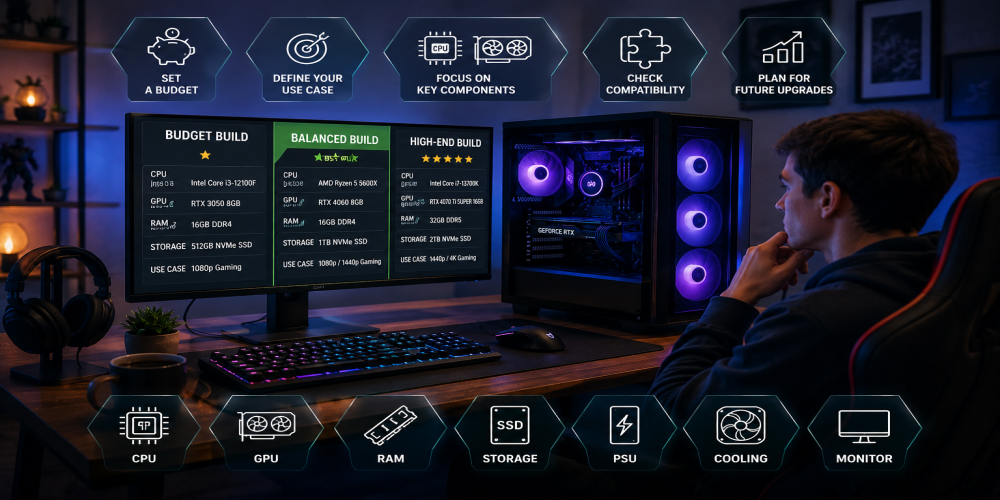
Buying a gaming PC can feel like entering a store where every product claims to be essential. More processor cores promise better performance, enormous power supplies suggest future security, and glowing cases somehow make ordinary memory modules look ready for space travel.
The good news is that you do not need the most expensive hardware to enjoy modern games. You need a balanced system built around the resolution, frame rate, and types of games you actually plan to play.
Overspending usually happens when buyers focus on impressive specifications instead of practical performance. A powerful processor paired with a modest graphics card may look excellent on a product page but deliver disappointing results in demanding games. An expensive graphics card can also become poor value when connected to a basic 1080p monitor with a low refresh rate.
This guide explains how to choose a gaming PC without paying for performance, storage, cooling, or visual features you are unlikely to use.
Start With the Games You Actually Play
The first step is not choosing a graphics card or comparing processor benchmarks. It is identifying the games that will run on the computer.
Competitive games such as tactical shooters, racing titles, and multiplayer arena games often benefit from high frame rates. Large cinematic adventures usually place greater pressure on the graphics card, especially when played at higher resolutions and detailed visual settings.
Strategy games, simulation titles, heavily modified games, and large multiplayer environments can depend more strongly on processor performance and memory capacity. Smaller independent games may run perfectly well on relatively modest hardware.
Create a short list containing the most demanding games you expect to play. Include future releases only when you genuinely plan to purchase them. Building an expensive computer for one unconfirmed game that may arrive years later is rarely a sensible use of money.
Choose Your Target Resolution Before Your Components
Screen resolution has a major influence on the graphics performance you need. A computer designed for 1080p gaming can cost considerably less than one intended for 4K.
1080p Gaming
Full HD remains a practical choice for budget systems, competitive players, and anyone using a smaller monitor. It requires less graphics power and makes high frame rates easier to achieve.
A balanced midrange system can provide excellent 1080p performance without expensive flagship hardware. This is often the best starting point for first-time PC buyers.
1440p Gaming
1440p offers a noticeable improvement in image clarity while remaining less demanding than 4K. It is a strong middle ground for players who enjoy detailed single-player games and fast multiplayer titles.
This resolution usually requires a stronger graphics card, but it does not automatically require the most expensive processor, cooling system, or power supply.
4K Gaming
4K produces a sharper image but increases graphics workload significantly. Reaching high frame rates at native 4K with maximum settings can become extremely expensive.
Before building a 4K system, consider whether the visual difference matters at your monitor size and viewing distance. Modern upscaling technologies can also reduce the need to render every game at full native resolution.
Set a Total Budget Including the Monitor and Accessories
A common mistake is spending the entire budget on the computer tower. A gaming setup may also require a monitor, keyboard, mouse, headset, speakers, operating system, network equipment, and possibly a desk or chair.
Decide how much you can spend on the complete setup before selecting individual components. A powerful computer connected to an old monitor may provide less noticeable improvement than a slightly cheaper system paired with a better display.
Keep a small part of the budget available for unexpected costs. Additional fans, cables, adapters, storage, or delivery charges can quickly turn a carefully planned purchase into an expensive surprise.
Spend the Largest Share on the Graphics Card
For most gaming systems, the graphics card has the greatest influence on visual quality and frame rate. It should usually receive the largest single portion of the component budget.
That does not mean buying the fastest card available. Choose a model designed for your target resolution and expected settings. Paying substantially more for a small performance improvement is rarely worthwhile in a value-focused build.
Compare real gaming benchmarks rather than relying only on model names, memory capacity, or marketing descriptions. A graphics card with more video memory is not automatically faster than another card with less.
Pay attention to performance in the types of games you play. Some graphics cards perform differently depending on ray tracing, upscaling, frame-generation support, game engine, and resolution.
Avoid Buying More Processor Than You Need
The processor supports game logic, background tasks, physics, artificial intelligence, and communication with the graphics card. It matters, but many gaming builds spend too much on it.
A modern midrange processor is usually enough for gaming, streaming, communication software, and everyday work. Premium models become more useful for professional rendering, heavy video production, large simulations, or competitive gaming at extremely high frame rates.
At higher resolutions, graphics performance often becomes the primary limitation. Spending hundreds more on a processor may produce only a small improvement if the graphics card is already working at full capacity.
Choose a processor that is strong enough to support the graphics card without dominating the budget. A balanced combination usually delivers a better experience than pairing one premium component with several weak ones.
Understand How Much RAM You Really Need
Memory capacity influences multitasking, loading behavior, and the ability to run demanding games alongside browsers, launchers, voice chat, and background applications.
For a modern gaming system, 16 GB is generally a practical minimum. It can handle many games comfortably when unnecessary background software is controlled.
Moving to 32 GB provides more breathing room for newer releases, large modifications, streaming, creative applications, and heavy multitasking. It is often a sensible target for a system expected to remain in use for several years.
More than 32 GB is rarely necessary for gaming alone. Large memory configurations become useful for professional workloads, virtual machines, high-resolution content creation, and specialized software.
Memory speed and configuration matter as well. Two matching modules usually provide better performance than a single module of the same total capacity.
Do Not Overpay for Storage
A solid-state drive should be standard in a modern gaming computer. It improves system responsiveness, installation speed, file transfers, and game loading compared with an older mechanical drive.
However, buying the fastest premium drive available may not create a dramatic difference during ordinary gaming. Benchmark results can show impressive transfer rates that are rarely reached during normal use.
A reliable 1 TB drive is a practical starting point, although players with large libraries may prefer 2 TB. Consider buying enough storage for your regularly played games rather than attempting to install an entire digital collection at once.
Check whether the motherboard has additional storage slots. Starting with one reasonably priced drive and adding another later can be more economical than purchasing a large premium model immediately.
Choose a Motherboard for Features, Not Status
The motherboard connects every major component, but it does not need to be luxurious. Expensive boards often include additional expansion slots, stronger power delivery, advanced overclocking controls, premium audio, and decorative features.
Most gaming systems need a motherboard with the correct processor socket, enough memory slots, suitable storage connections, reliable networking, and the required ports.
Check for Wi-Fi and Bluetooth if you need them. Adding these features separately may reduce the savings from choosing a cheaper board.
Also confirm that the board supports the selected processor without requiring a complicated firmware update. Compatibility tools are helpful, but the manufacturer’s official support list remains the safest reference.
Buy a Reliable Power Supply Without Going Excessive
The power supply is not an exciting component, but it should never be treated as an afterthought. A low-quality unit can create instability and place the rest of the system at risk.
Choose a reputable model with appropriate protection features, sufficient wattage, and the connectors required by the graphics card. Independent technical reviews are more useful than product descriptions or efficiency labels alone.
You do not need to double the estimated system consumption. A reasonable amount of extra capacity supports temporary power spikes, quieter operation, and future upgrades without wasting money on an oversized unit.
Modular cables can make building easier, but they are not essential. A well-designed non-modular power supply may offer better value when the case has enough cable-management space.
Do Not Let Cooling Consume the Budget
Many gaming processors can be cooled effectively by a modest air cooler. Large liquid systems may look impressive, but they are often unnecessary for midrange hardware.
Cooling should match the processor’s heat output and the airflow inside the case. Installing an expensive cooler on an efficient processor will not improve gaming performance in a meaningful way.
A good air cooler is usually affordable, reliable, and easy to maintain. Liquid cooling becomes more reasonable for high-power processors, restricted case layouts, visual preferences, or specialized workloads that keep the processor under heavy load for extended periods.
Case airflow matters just as much as the cooler itself. A case with open ventilation and several properly positioned fans may outperform a more expensive design with a decorative but restrictive front panel.
Choose a Practical Case
A gaming case should fit the motherboard, graphics card, power supply, cooler, storage devices, and fans. It should also provide reasonable airflow and enough space to assemble the system without unnecessary difficulty.
Do not pay a premium simply because a case includes glass panels and elaborate lighting. Visual design has no effect on frame rate, even when the product photos strongly suggest otherwise.
Check the maximum supported graphics card length and processor cooler height. Modern graphics cards can be large, and compact cases may require careful component selection.
Dust filters, removable panels, accessible cable routes, and included fans provide more practical value than complex lighting systems.
Decide Whether You Need a Prebuilt PC or Custom Build
A custom-built computer usually provides more control over component quality and budget distribution. It also makes future repairs and upgrades easier because every part is selected individually.
A prebuilt system offers convenience, assembly, testing, technical support, and one warranty covering the complete machine. It may be the better option for buyers who do not want to build or troubleshoot a computer.
Prebuilt systems are not automatically poor value, but their specifications require careful examination. Some use strong processors and graphics cards while saving money on the power supply, motherboard, cooling, memory configuration, or storage.
Questions to Ask Before Buying a Prebuilt PC
- What exact graphics card model is included?;
- Does the memory use one module or two?;
- What is the power supply brand and wattage?;
- Can standard components be replaced later?;
- How many storage slots are available?;
- Does the case provide sufficient airflow?;
- What does the warranty cover?;
A product listing that hides component details should be treated cautiously. Clear specifications make it easier to judge value and identify future upgrade limitations.
Match the PC to Your Monitor
A computer and monitor should be chosen as one system. Buying graphics performance that the display cannot show is an easy way to overspend.
A 60Hz monitor displays up to 60 frames each second. A computer producing far more can still feel more responsive in some situations, but much of the visual benefit requires a higher-refresh-rate screen.
Competitive players may prefer 120Hz, 144Hz, or faster displays. Players focused on cinematic adventures may value resolution, contrast, color quality, or display size more than maximum refresh rate.
Adaptive synchronization can reduce visible tearing and improve smoothness when frame rate changes. Check that the monitor and graphics card support compatible technology.
Avoid Paying for Maximum Graphics Settings
Ultra settings are frequently designed to produce the highest possible image quality rather than the best balance of performance and appearance. The difference between high and ultra may be difficult to notice during normal gameplay.
Reducing shadows, reflections, volumetric effects, or distant detail can create a substantial frame-rate improvement with only a small visual change.
Ray tracing can improve lighting and reflections, but it also places a heavy demand on the graphics card. Decide whether the effect matters in the games you play before spending extra money specifically for it.
A value-focused gaming PC should aim for enjoyable performance at sensible settings, not maximum settings in every future release.
Use Upscaling and Frame Technologies Carefully
Modern games may include upscaling systems that render at a lower internal resolution before reconstructing a sharper image. This can improve performance without requiring more expensive hardware.
Frame-generation features may increase displayed frame rates, but they work best when the game already runs at a stable base level. They do not completely replace strong native performance.
Support differs between games and graphics card families. Do not buy a weak system based entirely on the assumption that every game will include a specific performance technology.
Treat these tools as useful additions rather than excuses to ignore basic hardware balance.
Plan for Upgrades Without Paying for Imaginary Ones
Future upgradeability is useful, but it can easily become another reason to overspend. Buyers sometimes purchase premium motherboards, enormous power supplies, and oversized cases for upgrades they never make.
Focus on realistic changes. Additional storage and memory are common upgrades. A future graphics card replacement is also possible when the power supply and case provide enough capacity.
Processor upgrades depend on motherboard compatibility and the life of the platform. Paying much more for a motherboard does not guarantee support for hardware released many years later.
A well-balanced computer that meets your needs today is usually better than an expensive compromise built around uncertain future plans.
Consider Used Components Selectively
Used hardware can reduce the cost of a gaming PC, particularly when buying a graphics card, processor, memory kit, case, or monitor.
However, every used component carries some risk. Ask for proof that the item works, inspect its physical condition, and check whether any warranty remains.
Power supplies and storage drives deserve additional caution because their condition is harder to evaluate. Saving a small amount on an old or unknown power supply is rarely worth the risk.
Used graphics cards can offer excellent value when purchased from a reliable seller. Test temperatures, fan behavior, display outputs, and gaming stability as soon as possible.
Do Not Ignore Noise and Power Consumption
A powerful computer may also produce more heat, consume more electricity, and require louder cooling. These ongoing costs are easy to overlook when comparing benchmark charts.
An efficient midrange system can provide a more pleasant experience in a bedroom, office, or small apartment. Lower heat output may also reduce the need for expensive cooling.
Check graphics card and processor power behavior in independent reviews. Two components with similar gaming performance can differ noticeably in temperature and noise.
Common Gaming PC Buying Mistakes
- Choosing components before deciding on a resolution;
- Spending too much on the processor and too little on the graphics card;
- Buying more RAM than gaming requires;
- Paying a premium for decorative lighting;
- Ignoring the quality of the power supply;
- Purchasing a 4K system for a basic 1080p monitor;
- Assuming more video memory always means more performance;
- Using only one memory module;
- Buying an expensive motherboard without needing its features;
- Planning unrealistic future upgrades;
The most expensive mistake is purchasing without comparing complete systems. A cheaper computer with balanced parts can outperform a more expensive model built around one impressive specification.
A Practical Gaming PC Budget Breakdown
Exact prices change frequently, but the graphics card should normally receive the largest portion of a gaming-focused budget. The processor comes next, followed by the motherboard, memory, storage, power supply, case, and cooling.
A reasonable starting distribution may look like this:
- Graphics card: approximately 35% to 45%;
- Processor: approximately 15% to 20%;
- Motherboard: approximately 8% to 12%;
- Memory: approximately 5% to 10%;
- Storage: approximately 5% to 10%;
- Power supply: approximately 7% to 10%;
- Case and cooling: the remaining budget;
This is not a strict formula. A system used for simulation games, streaming, or professional work may require a stronger processor and more memory. A dedicated gaming computer should usually prioritize graphics performance.
What Specifications Should a Budget Gaming PC Have?
A sensible budget system should target 1080p gaming, use a modern entry-level or midrange processor, include a dedicated graphics card, and provide at least 16 GB of dual-channel memory.
An SSD is essential for the operating system and games. The power supply should come from a reputable manufacturer and leave enough capacity for the installed graphics card.
A budget PC does not need liquid cooling, a premium motherboard, an oversized case, or complex lighting. Money saved in those areas can improve the graphics card, monitor, or storage capacity.
What Specifications Should a Midrange Gaming PC Have?
A midrange build should comfortably target 1080p at high refresh rates or 1440p at strong visual settings. It will usually benefit from 32 GB of memory and at least 1 TB of fast storage.
The processor should be modern and balanced rather than excessive. The graphics card should be selected according to real 1440p benchmarks in demanding games.
This category often provides the best value because it avoids the sharp price increases associated with flagship hardware while still delivering a noticeable improvement over entry-level systems.
When Is a High-End Gaming PC Worth It?
A high-end computer becomes reasonable when the user has a specific need for 4K gaming, very high refresh rates, demanding virtual reality, professional creative work, or advanced simulation.
It can also make sense for someone who values low noise and premium construction enough to pay for better cooling and component quality.
It is not necessary simply because gaming is an important hobby. A well-selected midrange system can run an enormous library of games and provide a better cost-per-frame result.
How to Compare Two Gaming PCs
Begin with the graphics card, then compare the processor, memory configuration, storage capacity, power supply quality, cooling, and upgrade options.
Ignore vague labels such as gaming-grade, ultra-fast, or performance edition. These phrases do not provide measurable information.
Look for independent benchmarks using similar hardware. Average frame rate is useful, but minimum and low-percentile results can reveal stuttering that a simple average hides.
Also compare the complete cost. A cheaper tower may require immediate memory, storage, or cooling upgrades that make it more expensive in practice.
Final Gaming PC Checklist
- Identify your most demanding games;
- Select a target resolution and refresh rate;
- Set a budget for the entire setup;
- Prioritize the graphics card for gaming;
- Choose a capable midrange processor;
- Install at least 16 GB of dual-channel memory;
- Use an SSD with enough practical capacity;
- Select a reliable power supply;
- Confirm case and component compatibility;
- Read independent reviews before purchasing;
Choosing the Right Gaming PC Without Overspending
The right gaming PC is not the machine with the longest specification list. It is the one that delivers the performance you need without forcing you to pay for unused features.
Start with your games, monitor resolution, and preferred frame rate. Build the budget around the graphics card, select a processor that supports it, and spend carefully on the remaining components.
Avoid premium motherboards, oversized power supplies, unnecessary memory, and expensive cooling unless they solve a specific problem. These components can be valuable, but they should never consume money that would create a more visible improvement elsewhere.
The goal is balance. A sensible gaming PC should feel fast, remain reliable, and provide a clear upgrade path without being designed for an imaginary future. It may not have the largest number on every product box, but it will leave enough money to purchase something surprisingly useful: actual games.